Page 1 of 1
Overheating
Posted: Mon Feb 18, 2008 8:14 am
by Naethyn
My setup has run fine for the last two years, until I started playing Medieval 2: Total War. After like an hour of playing my graphics cards get super hot and there are some obvious graphics flaws going on.
Anyways, I need to find a good way to cool my system down. I have two PCI slots open (one right between the SLI) so possibly a PCI fan would work. Anyone have a suggestion on how to get more cooling or a good PCI fan that you have used/heard of?
Thanks!
Re: Overheating
Posted: Mon Feb 18, 2008 8:22 am
by Naethyn
Re: Overheating
Posted: Mon Feb 18, 2008 8:41 am
by Harrison
Are you retarded and smoke next to your computer?
Try cleaning the heatsink/fan. Check if the fan is running at the correct RPM. (if at all)
Re: Overheating
Posted: Mon Feb 18, 2008 9:22 am
by Naethyn
I disassembled my entire computer and cleaned out the air filters. It's still having the same problem. Two graphics cards leads to a lot of heat and no game so far has pushed them so hard as MTW2. I ordered two of those coolers. One to go between the cards and one up top. Hopefully that cures it.
Re: Overheating
Posted: Mon Feb 18, 2008 12:45 pm
by Tikker
what case do you have?
probably the biggest issue is lack of air flow thru a shitty case
look at an antec p180, probably the best midsize tower you can buy these days (antec 900 is pretty ok too, and kinda screams your style)
Re: Overheating
Posted: Mon Feb 18, 2008 1:51 pm
by Naethyn
http://www.newegg.com/product/product.a ... 6811112073Seems others have had similar problems.


As you can see putting a north bridge between two graphics cards in SLI is a serious design flaw.
Re: Overheating
Posted: Mon Feb 18, 2008 2:00 pm
by Tikker
well, if your case actually had proper airflow, it wouldn't be that big of a deal
seriously, check out the antec p180
it's a fantastic case
you can mount a 120mm fan that would blow right between those 2 cards I bet
Re: Overheating
Posted: Fri Feb 22, 2008 7:02 am
by Ganzo
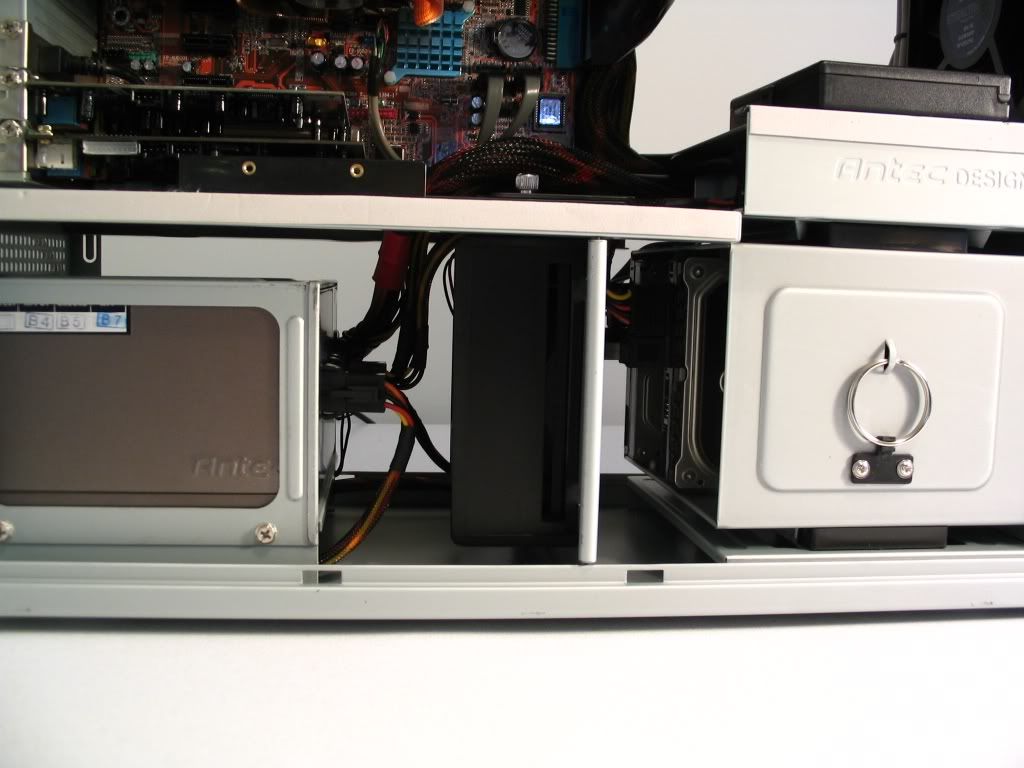
Tikker i just looked at that case on newegg, and from pictures, there is no airflow at all to harddrives, wouldn't this case have major overheat to hd if you ran 10k drive
Re: Overheating
Posted: Fri Feb 22, 2008 8:17 am
by Naethyn
Those are 2 Raptor 10k drives. The front has a fan and it pulls air from the bottom. The problem is no air can get passed all the power cables to get up to the mobo area.
Re: Overheating
Posted: Fri Feb 22, 2008 3:17 pm
by Jay
Or maybe your computer is trying to martyr itself for the cause of saving the internet from your retardism. Or maybe it's airflow. One or the other.
Re: Overheating
Posted: Fri Feb 22, 2008 4:47 pm
by Naethyn
 JAY
JAY
Re: Overheating
Posted: Fri Feb 22, 2008 4:48 pm
by Naethyn
Err wait. That would imply you have somone waiting in bed for you. X that....
Re: Overheating
Posted: Fri Feb 22, 2008 4:48 pm
by Tikker
Ganzo wrote:Tikker i just looked at that case on newegg, and from pictures, there is no airflow at all to harddrives, wouldn't this case have major overheat to hd if you ran 10k drive
there's a 120mm fan mounted right beside the 4 hdd rack, it pulls air from outside, across the HDD's and out the back
if you mount the HDD's in the upper chamber, it's fresh air from outside, pulled across the HDDs and out the top 120mm fan
Re: Overheating
Posted: Fri Feb 22, 2008 4:51 pm
by Naethyn
Upper chamber? You mean where the 5 1/2" are?
Re: Overheating
Posted: Fri Feb 22, 2008 7:11 pm
by Jay
Naethyn wrote:Err wait. That would imply you have somone waiting in bed for you. X that....
I would say YOUR girlfriend but then we'd have to be best friends for that to happen.
Re: Overheating
Posted: Sat Feb 23, 2008 12:46 pm
by Tikker
Naethyn wrote:Upper chamber? You mean where the 5 1/2" are?
yup, you can mount a couple more HDD's in there
I've got 6 HDD's in my case
Re: Overheating
Posted: Sun Feb 24, 2008 8:09 am
by Ganzo
Tikker wrote:Ganzo wrote:Tikker i just looked at that case on newegg, and from pictures, there is no airflow at all to harddrives, wouldn't this case have major overheat to hd if you ran 10k drive
there's a 120mm fan mounted right beside the 4 hdd rack, it pulls air from outside, across the HDD's and out the back
if you mount the HDD's in the upper chamber, it's fresh air from outside, pulled across the HDDs and out the top 120mm fan
didn't see that fan on pictures, those make it look like botom part of case is close off
in this case ya good lookin case
Re: Overheating
Posted: Sun Feb 24, 2008 11:30 am
by Tikker
Re: Overheating
Posted: Sun Feb 24, 2008 11:38 am
by Tikker
Re: Overheating
Posted: Mon Feb 25, 2008 8:49 am
by Naethyn
That's a pretty good review.